Introduction
The choice of trading platform is a critical decision for active traders, second only to capital allocation. A trading platform serves as the hub for executing trades, analyzing charts, developing strategies, and managing positions. Selecting the right platform can enhance your workflow and overall trading experience, while a poor choice may lead to frustration and inefficiency.
Three platforms consistently come up when serious traders compare options: TradingView, thinkorswim, and Trading Station (FXCM’s platform — not to be confused with the US broker TradeStation). Each has a distinct strength. TradingView is best known for its charting but relies on connected brokers for execution. thinkorswim is a full brokerage platform with a steep learning curve. Trading Station is built for algorithmic forex and CFD traders, with limited regional availability. Understanding what each actually does helps you pick the right fit for how you trade.
Overview of Each Platform

TradingView: The Web-Based Charting Powerhouse
TradingView is a web-based platform that reports over 100 million registered users. While it connects to various brokers for trade execution, its primary strength lies in its charting tools.
What Makes It Stand Out: TradingView features Pine Script, which allows traders to create custom indicators and backtest strategies without needing extensive coding skills. The platform also fosters a social environment where users can share insights and learn from one another.
thinkorswim: Charles Schwab’s Professional Platform
thinkorswim is a professional-grade platform owned by Charles Schwab — it came over in the TD Ameritrade acquisition, and all former TD Ameritrade accounts were migrated to Schwab in 2024. It is free for Schwab clients (no platform fee) and is tailored to serious traders willing to invest time in mastering it.
What Makes It Stand Out: This platform offers a broad range of built-in tools, educational resources, and a paper trading environment, creating a complete ecosystem for traders. Although it may seem overwhelming initially, it becomes a powerful tool with familiarity.
Trading Station: FXCM’s Advanced Trading Platform
Trading Station is FXCM’s proprietary platform designed for algorithmic trading and strategy automation, primarily catering to forex and CFD traders. FXCM does not accept US clients, so availability depends on your region.
What Makes It Stand Out: The platform excels in advanced strategy optimization and automated trading, making it an excellent choice for systematic traders, though it may not be as beginner-friendly.
Detailed Platform Reviews
TradingView Deep Dive
Pricing and Subscription Tiers
TradingView offers a free tier plus four paid plans (per-month prices below are for annual billing — paying monthly costs a bit more; checked October 2026 on TradingView’s pricing page):
| Plan | Monthly cost (annual billing) | Key Features |
|---|---|---|
| Basic (free) | $0 | Basic charting with ads, 1 chart/tab, limited alerts |
| Essential | $12.95 | 5 indicators/chart, 2 charts/tab, ad-free |
| Plus | $24.95 | 10 indicators/chart, 4 charts/tab, more alerts |
| Premium | $49.95 | 25 indicators/chart, 8 charts/tab, 400 price alerts |
| Ultimate | ~$199.95 | 50 indicators/chart, 16 charts/tab, pro features |
Best Plan for Most Traders: Plus or Premium covers most active traders; the free tier is enough to evaluate whether you like the platform. Confirm current pricing — TradingView adjusts its plans regularly.
Charting Capabilities
TradingView’s charting is among the best in the industry:
- Over 400 technical indicators, including both standard and exotic options.
- Multiple chart types (candlestick, OHLC, Renko, etc.).
- Custom indicators can be created using Pine Script.
- Backtesting capabilities against historical data.
- Flexible time intervals from seconds to months.
- Versatile drawing tools for trendlines and patterns.
Order Execution
A significant limitation of TradingView is its lack of direct order execution. Instead, it connects to over 80 brokers, meaning the quality of execution can vary based on the broker selected. Often, users may need to switch to their broker’s platform for more complex trades.
Mobile Experience
TradingView’s mobile app provides full charting capabilities, a responsive design, and alert functionalities, making it the leading mobile trading app for technical analysis.
Community and Education
The vibrant community on TradingView allows traders to share analysis and learn from one another. This collaborative environment can be invaluable for traders at all experience levels.
Rating Summary
- Charting: 10/10
- Execution: 5/10
- Learning Curve: 7/10
- Mobile: 9/10
- Community: 9/10
- Overall: 8/10
thinkorswim Deep Dive
Pricing: Free with a Charles Schwab Account
thinkorswim is available at no platform cost with a Schwab account — standard commissions apply ($0 stock trades, $0.65 per options contract).
Charting Capabilities
thinkorswim offers professional-grade charting capabilities, making it a strong competitor to TradingView:
- Hundreds of built-in technical studies.
- Support for multiple chart types.
- Custom indicators can be created with thinkScript.
- Unlimited chart tabs and alerts.
Order Execution
Where thinkorswim excels is in execution speed and reliability. It offers direct execution through Schwab, allowing for complex order types and rapid transaction speeds.
Key Features and Learning Curve
- The PaperMoney feature allows for risk-free trading.
- Scanning capabilities enable traders to filter stocks based on technical criteria.
- The learning curve can be steep, with new users often taking weeks to feel proficient.
Rating Summary
- Charting: 9/10
- Execution: 9.5/10
- Learning Curve: 4/10
- Overall: 9.5/10
Trading Station Deep Dive
Pricing: Free with an FXCM Account
Trading Station is available at no platform cost through FXCM, making it accessible for forex and CFD traders — in regions where FXCM operates (it does not serve US residents).
Charting and Execution
Trading Station offers solid charting and good execution speed, optimized mainly for forex trading. Its features include:
- Over 100 pre-loaded indicators.
- Direct execution capabilities through FXCM.
- Strong support for algorithmic trading, with user-friendly programming options.
Learning Curve
While the learning curve is moderate, it can be challenging for traders new to algorithmic trading.
Rating Summary
- Charting: 8.5/10
- Execution: 8.5/10
- Overall: 8.5/10
Head-to-Head Comparison
For a two-way deep dive on the most common pairing, see our dedicated TradingView vs thinkorswim comparison.
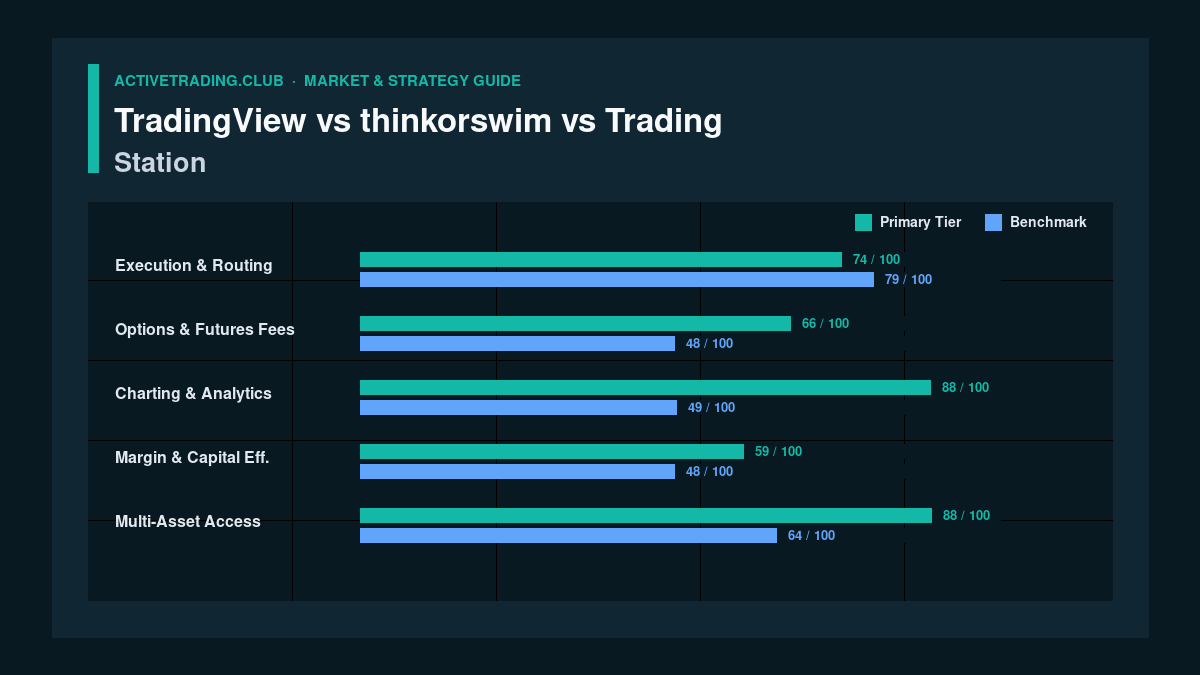
Charting Quality: TradingView Dominates
Winner: TradingView
TradingView leads in charting quality, closely followed by thinkorswim.
Order Execution: thinkorswim
Winner: thinkorswim
For fast and reliable execution, thinkorswim is the clear choice.
Mobile Trading: TradingView
Winner: TradingView
TradingView’s mobile app is the best option for serious technical analysis on the go.
Learning Curve: TradingView
Winner: TradingView
TradingView is the most accessible for beginners, while thinkorswim may be daunting at first.
Overall Cost Comparison
Both thinkorswim and Trading Station are free, while TradingView offers a Premium plan at a cost but provides superior charting features.
Options Trading: thinkorswim
Winner: thinkorswim
It provides the best tools for options analysis and strategy.
Algorithmic Trading: Trading Station
Winner: Trading Station
It is exceptional for algorithmic traders due to its backtesting and automation capabilities.
Community and Education: TradingView
Winner: TradingView
TradingView has the largest and most active trading community.
Which Platform Should You Choose?

The best platform for you will depend on your specific needs:
For Beginners: TradingView (free or Essential)
Ideal for its user-friendly interface and community support, though order management will require a connected broker — or a broker whose platform you like, via our broker finder.
For Day Traders: thinkorswim (Free with Schwab)
Offers excellent execution and analysis tools, but expect a steep learning curve.
For Swing Traders: TradingView Plus or Premium
Great for charting and straightforward broker-linked execution.
For Options Traders: thinkorswim (Free with Schwab)
Provides strong tools for options analysis — and per-contract fees matter, so run the numbers on our broker fee calculator before you commit.
For Algo Traders: Trading Station (Free with FXCM)
Best suited for strategy automation, limited to forex and CFDs, and not available to US residents.
For Professional Traders: thinkorswim + TradingView
Combining both platforms offers the best in charting and execution.
Can You Use Multiple Platforms?
Many professional traders effectively utilize multiple platforms, such as using TradingView for analysis while executing trades on thinkorswim.
Conclusion
No single platform suits every trader. Your choice will depend on your asset class, trading style, and experience level.
Bottom Line Recommendations:
- For charting: TradingView remains the top choice.
- For an all-in-one solution: thinkorswim excels.
- For algorithmic trading: Trading Station is the leader.
Take the time to test each platform to find the one that best aligns with your trading style — and size every position you take with our position size calculator. Ultimately, consistent practice and disciplined execution matter more than the platform you choose.
This article is for education only and is not financial advice. Trading involves substantial risk of loss. Platform features and pricing change — verify on each provider’s site: TradingView, Charles Schwab, FXCM.